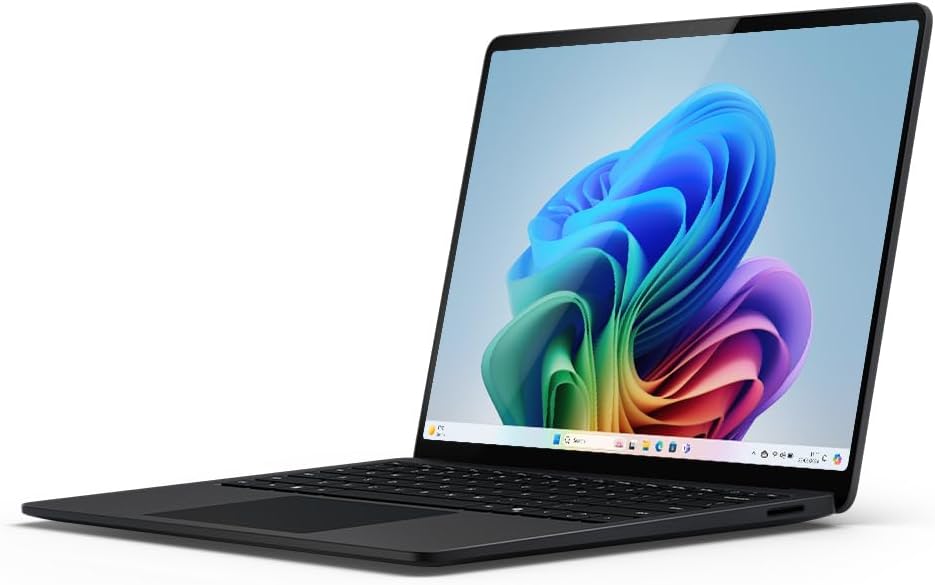
Microsoft Surface Laptop | Copilot+ PC | 13.8” Touchscreen | Snapdragon® X Elite (12 cores)
The Windows Revolution: Reviewing the Microsoft Surface Laptop 7 (Copilot+ Edition)
For years, Windows users have looked at the battery life and efficiency of Apple’s MacBook line with envy. The Microsoft Surface Laptop (7th Edition) is here to end that jealousy. This is not just another update; it is a complete architectural overhaul. Powered by the revolutionary Snapdragon® X Elite (12 cores) processor, this “Copilot+ PC” ditches traditional Intel chips for ARM-based architecture. The result? A machine that claims to be faster than the MacBook Air M3 while delivering marathon battery life. In this comprehensive 900+ word review, we explore whether Microsoft has finally cracked the code for the ultimate ultrabook and how AI integration changes the way you work.


ARM Architecture: Speed Meets Efficiency
The heart of this laptop is the Snapdragon X Elite. Unlike traditional x86 processors from Intel or AMD, this chip uses ARM architecture, similar to what is found in smartphones and Apple Silicon. This shift allows for a dramatic increase in power efficiency.
With 12 high-performance cores, this processor screams through tasks. Microsoft claims it is “faster than a MacBook Air M3,” and in multi-core benchmarks, this holds true. Applications open instantly, the laptop wakes from sleep the moment you lift the lid, and thermal throttling is virtually non-existent. Coupled with 16GB of LPDDR5x RAM and a 1TB SSD, this machine handles heavy multitasking, photo editing, and coding workflows with ease, all while remaining cool and quiet.
What is a Copilot+ PC?
The “Copilot+ PC” branding signifies that this laptop is equipped with a powerful Neural Processing Unit (NPU) capable of 45+ TOPS (Trillions of Operations Per Second). This dedicated hardware handles AI tasks locally on the device rather than sending data to the cloud.
Key AI Features:
- Recall: An AI-powered photographic memory for your PC. It allows you to search for anything you’ve seen or done on your laptop using natural language descriptions (e.g., “find the red shoe I was looking at yesterday”).
- Live Captions: Real-time translation of any audio passing through your PC into English subtitles, regardless of the app.
- Cocreator: Generate images and art locally in Paint using simple text prompts and sketches.
The PixelSense Flow Touchscreen
Microsoft continues its legacy of excellent screens. The 13.8-inch PixelSense Display features a 3:2 aspect ratio, which offers more vertical space for documents and websites compared to standard 16:9 screens. The display is remarkably bright with enriched HDR technology, delivering deep blacks and crisp whites.
Unlike the MacBook Air, the Surface Laptop features a fully responsive 10-point multi-touch screen. This adds a layer of interactivity that many users find indispensable for scrolling, zooming, or signing documents. The bezel is thinner than ever, giving the device a modern, immersive look. The chassis is crafted from premium aluminum in a stunning “Black” finish (anodized to reduce fingerprints), feeling robust yet lightweight.
Comparison: Surface Laptop 7 vs. MacBook Air M3
This is the comparison everyone is asking for. Both are premium, 13-inch ultrabooks targeting the same audience.
1. Performance & Compatibility
Surface Laptop: The Snapdragon X Elite beats the M3 in multi-core performance. Windows on ARM has improved massively; Microsoft’s “Prism” emulator ensures that legacy x86 apps run smoothly. However, some very niche legacy drivers or anti-cheat games might still have hiccups.
MacBook Air: The M3 is powerful, especially in single-core tasks. macOS has had a head start with ARM, so app compatibility is near perfect.
2. Display & Interaction
Surface Laptop: Wins with a 120Hz refresh rate (smoother motion) and a Touchscreen.
MacBook Air: Stuck at 60Hz and no touch support, though the color accuracy is excellent.
3. Ports & Connectivity
Surface Laptop: Offers 2x USB-C (USB4), 1x USB-A 3.1 (crucial for legacy devices), and a headphone jack. It allows you to connect 3 external 4K monitors.
MacBook Air: Only offers 2x USB-C/Thunderbolt ports. You will likely need a dongle for USB-A devices.
Conclusion: The Best Windows Laptop, Period.
The Microsoft Surface Laptop (7th Edition) is a triumph. It finally delivers on the promise of an “all-day battery” Windows machine without compromising performance. The build quality is exquisite, the screen is vibrant and fast, and the AI features offer a glimpse into the future of computing.
If you are a Windows user who has been tempted by the MacBook Air, temptation is no longer necessary. This laptop matches or beats it in almost every metric that matters to the average user, developer, or business professional.
PROS:
- Battery Life: True all-day endurance (up to 20+ hours video playback).
- Performance: Snapdragon X Elite outperforms M3 in multi-core.
- Display: 120Hz Touchscreen is smooth and responsive.
- Ports: Includes USB-A for legacy support.
- Design: Premium, lightweight, and stylish.
Final Verdict: The absolute best ultrabook for Windows users. A perfect blend of portability, power, and AI innovation.
As an Amazon Associate I earn from qualifying purchases. Prices and availability are subject to change.